 Gherkin Studio
Leaving a Connect app? Move now, pay later.
Atlassian Connect end of support is 31 January 2027. If your BDD app for Jira runs on Connect, now is the time to move to a Forge app. This offer is for you.
Import guide
Bring your scenarios over before 31 January 2027
Atlassian Connect reaches end of support on 31 January 2027. This guide moves your scenarios to Gherkin Studio without losing work. Keep your current app installed until you've checked everything.
Before you start
- You need to be a Jira admin to import, and a project admin to connect Git.
- Pick a quiet time and ask your team not to edit scenarios during the import.
1. Get your .feature files
Features already in Git: download the .feature files, or a zip of the folder, from your repository.
Features only inside Jira: use your current app's export to get the .feature files as a zip. Include scenarios marked as manual if your app offers that option.
Not sure how? Write to us with the name of your app and we'll tell you the steps.
2. Install Gherkin Studio
From the Atlassian Marketplace, once it's live. Install before 31 January 2027 and it's free until 28 February 2027; later, your first 3 months are free.
3. Import
- Open Jira settings → Apps → Gherkin Studio.
- Choose where you're coming from, optionally limit to certain project keys, and upload the zip or the
.featurefiles. - Read the preview. Each feature or scenario is matched to a story by its
@KEY-123tag, a# Jira: KEY-123comment in the file header, or a file name likeKEY-123.feature. Several files for one story are joined into one valid feature. - If a story already has scenarios, choose Skip (default), Add after the existing ones, or Replace.
- Press Import and check the result column. Files we could not match are listed with the reason.
4. Connect Git (optional)
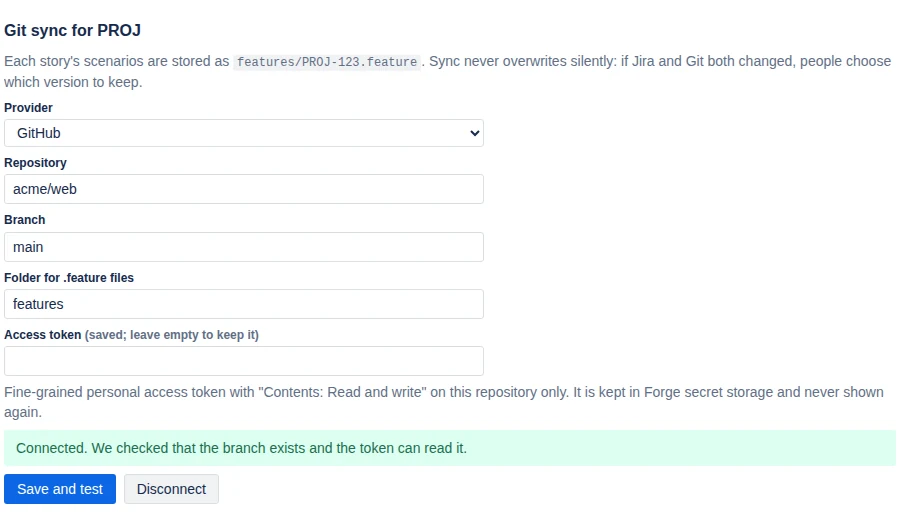
In Project settings → Gherkin Studio, pick GitHub, GitLab.com or Bitbucket Cloud, the repository, branch and folder, and paste a token with write access to that repository only. We test the connection before saving. Each story syncs to <folder>/KEY-123.feature.
5. Send test results (optional)
In Apps → Gherkin Studio, create a CI token, save it as a secret in your CI, and add one step after your tests:
curl -X POST "$GHERKIN_STUDIO_URL?build=$BUILD_URL" \
  -H "Authorization: Bearer $GHERKIN_STUDIO_TOKEN" \
  -H "Content-Type: application/json" \
  --data-binary @cucumber.json
6. Check, then switch off the old app
- Open a few stories and compare with your old app.
- Run your test suite once and check the results appear on the stories.
- When you're happy, uninstall the old app. Your Git repository is untouched either way.
Stuck? Write to us. We're happy to help you through it.